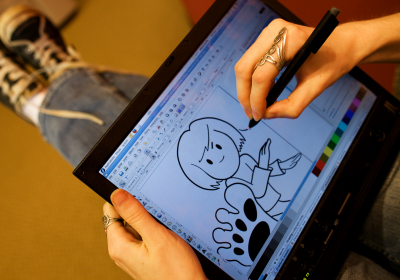
(That’s Fedora 12 Beta’s Inkscape on my Thinkpad x61 with a built-in Wacom digitizer in the photo. Photo credit David Aquilina, CC-BY-3.0)
Got a tablet, or want to get one, but not sure it’s going to work out in Linux? Here’s how my Thinkpad x61’s built-in Wacom tablet works in Fedora 12 Beta:
- Tablet pressure sensitivity out-of-the-box, no xorg.conf needed! (Well okay, so that’s been the case for a couple Fedora releases now 😉 )
- Cellwriter provides handwriting recognition text input (no more having to flip the tablet back to keyboard mode just for one stupid little thing.)
- Xournal is great for taking notes & signing documents. No more print, sign, and re-scan; I can just sign emailed digital documents on screen and email them right back.
- Gimp brush dynamics effects rock – they’re the secret to achieve quite a few of the effects in the Fedora 12 wallpaper designs.
- The new Inkscape in Fedora 12 has a cool new feature that allows you to create your own brushes and save them or choose from a collection of preset brushes.

Fedora is truly committed to software freedom. Enjoy great features like this without the guilt. Try Fedora 12 RC3 today. Or wait until Fedora 12 final comes out:


 Máirín Duffy
Please download http://alt.fedoraproject.org/pub/alt/stage/12-RC.3/ instead of beta. Beta is too old and has many known bugs fixed in the latest release candidate.
Posted by Rahul Sundaram | November 8, 2009, 5:02 amCool I updated the link!
Posted by mairin | November 8, 2009, 11:42 amI think RC4 is now available, but the site is fairly bandwidth limited; there shouldn’t be much functional difference between RC3 and RC4 for most users.
Posted by Paul W. Frields | November 9, 2009, 3:08 amWow, I know what I want for christmas 😉
Didn’t even know such a thing existed!
Posted by pel | November 8, 2009, 7:19 amIt’s amazing – highly recommended 🙂
Posted by mairin | November 8, 2009, 11:42 amDoes F12 have a tool which enables the rotation of the screen and tablet together? So that when you flip the screen round (as it looks like you have in that photo) it turns the screen upside down (manually or automatically) and also rotates/flips the wacom tablet too?
Posted by Alan Pope | November 8, 2009, 8:21 amYou can set that up (depending on your hardware, if it has the sensor required or not) but unfortunately F12 doesn’t do that out-of-the box. We do have a display settings applet that can be docked in the tray area that has a little dropdown that allows you to rotate the screen how you like.
Posted by mairin | November 8, 2009, 11:43 amYeah, Ubuntu is the same in that regard. We really need to fix that.
Posted by Alan Pope | November 8, 2009, 12:38 pm@Alan I wonder how you detect it though; my understanding is that the tablet hardware doesn’t have a standardized way of doing it.
Posted by mairin | November 8, 2009, 1:00 pmNot sure if you can detect the rotation of the tablet, but I’m less bothered about detecting. I’m more interested in making sure the display and tablet are in sync. So if someone chooses left, right or inverted from the display panel doofer they get a rotated display and tablet together.
As I understand it “xinput list” tells us whether we have a tablet at all. I have seen scripted versions of this which use both “xrandr” and “xsetwacom” together. Would be nice to put a GUI on that though.
Posted by Alan Pope | November 8, 2009, 1:10 pm@Alan ah okay. I think it would be slick if you rotated it for it to detect that and automagically rotate the screen but your point about aligning screen and tablet position is certainly more practical. 🙂 I used to have a script to do it, but it wasn’t worth the trouble – I don’t actually tend to turn my screen. I see how it would be quite useful though and a GUI tool to do it would be great progress.
Posted by mairin | November 9, 2009, 2:10 amFedora includes binary-blob firmware for wireless drivers:
http://fedoraproject.org/wiki/SIGs/FirmWare
Best remove them if you’re truly committed to freedom.
Posted by someone | November 8, 2009, 8:46 amI wonder why you post anonymously. It’s interesting.
It’s true that there is some binary blob wireless firmware in Fedora. However, you’ll note on the very page you linked to that the only ones included are licensed as being freely redistributable. So you won’t have to worry about being in trouble with the law for using them.
Posted by mairin | November 8, 2009, 11:39 amSo freedom to distribute is the critical freedom for Fedora?
Posted by J.B. Nicholson-Owens | November 8, 2009, 9:05 pm@JB I don’t know that it’s *the* critical freedom for Fedora. It certainly is a very important one for ME as a Fedora user. I occasionally do freelance artwork for clients and I definitely enjoy being able to hand them a functional live CD or bootable USB stick with the source files for their artwork, all the fonts (I only design with freely licensed, re-distributable fonts), and the software I used to make the designs so if I get hit by a bus or if they want to make some mods to the artwork they are free to do so without shelling out any more cash or having to reinstall their own machines or worry about buying licenses for fonts and all the rest.
Posted by mairin | November 8, 2009, 9:46 pmPlease don’t start this again… only because the firmware is on your harddisk rather than in some flash/rom chip does not make it any different.
That being said firmware is considered as part of the hardware.
Posted by drago01 | November 9, 2009, 2:24 pmOpenSuse is the most epic fail with my tablet pc.
Ubuntu is ok with it, but the stylus button doesn’t right click, which fucking sucks, I was fucking way off better editing config lines.
So does the button on the stylus right clicks on Fedora 12?
Posted by Dread Knight | November 8, 2009, 12:03 pmBy default, the stylus button on my x61 does a middle click (I actually quite like this as it allows me to pan around a drawing in inkscape with the pen without the tedium of interacting with the scrollbars.)
However, if you’d like it to be mapped to right click it’s one command:
xinput set-button-map ‘Wacom Serial Tablet PC Pen Tablet/Digitizer’ 1 3 2 4 5 6 7 8 9 10 11 12 13 14 15 16 17 18 19 20 21 22 23 24 25 26 27 28 29 30 31 32
(replace the Wacom device name with the name of your stylus device, available at xinput –list)
Do you think right click would be a better default?
Posted by mairin | November 8, 2009, 12:23 pmThanks for the info, but it would probably need to be a start-up command as far as I recall, because after each restart and such, it gets back to the defaults.
Panning is cool, maybe it’s just me, but in more apps I find right click way more useful than middle one….
Posted by Dread Knight | November 8, 2009, 12:45 pmThe issue I think it was that in Ubuntu it was left clicking for me. Middle click seems quite cool :3
Posted by Dread Knight | November 8, 2009, 12:46 pmI think we should build a UI to set these preferences. I can see how right-click would be useful for someone, but I enjoy my middle-click. It should also make sure the preferences are sticky (and I didn’t realize when I gave you that command that it wasn’t persistent, so I apologize for that.)
Posted by mairin | November 8, 2009, 7:33 pmI believe Thinkpad Tablet models have an accelerometer built in for parking the HD in case of sudden movement (I know my X41 does). Can the data coming from the accelerometer be used to rotate the screen automatically if you hold it in portrait/landscape mode?
Posted by Ivan | August 1, 2010, 3:31 pmBTW sorry for this, I posted in the wrong place. Should be a little higher, in you conversation with Alan.
Posted by Ivan | August 1, 2010, 3:34 pmThis looks very nice. Fedora is sweet! I’ve been dying to get my hands on an AlwaysInnovating touchbook. It’s got an ARM processor though, so it might get a little tricky installing Fedora on it.
Posted by Markus | November 8, 2009, 4:50 pmNeat. I remember when my IBM Thinkpad X41t’s tablet worked out of the box in F11. Now it doesn’t, and X crashes when using compiz or opening System Tools. I guess that’s the upgrade cycle. (Appropriate bugs filed.)
Posted by Richard | November 8, 2009, 9:12 pmHi Richard, i can’t say I’ve had the same problem with my x61 and I’m sure the technology is very similar to your x41. Actually, I used to get crashes in F10 when I first installed it, and the reason was that I had my old xorg.conf file – when I removed xorg.conf completely it worked wonderfully. I didn’t know I didn’t need it anymore so when I backed up my HDD from backup after installing I copied it over.
You should absolutely file bugs.
Posted by mairin | November 8, 2009, 9:48 pmThat looks awesome, Máirín!
Posted by Jono Bacon | November 8, 2009, 11:35 pmIf I remember correctly, you can speak some Japanese so you may be interested in http://tegaki.org/.
Posted by Mathieu | November 9, 2009, 12:00 amHi Mathieu! Thanks for the pointer! Actually Warren Togami showed this to me recently and I totally forgot about it – I definitely need to try it. Thanks for the reminder 🙂 Kakko ii app sou desu ne – Arigatou gozaimasu!
Posted by mairin | November 9, 2009, 2:13 amVery cool. I’ve been wondering about Fedora and tablets. That looks awesome.
Thanks for sharing!
Posted by Magnus | November 9, 2009, 3:21 amLately I was quite busy and din’t got time for drawing, I wonder if having such a tablet would make me draw more – it my not be so, I don’t like drawing on the old Wacom I have, but instant on-screen coordination is something much better.
Posted by Nicu | November 9, 2009, 7:02 amIt’s definitely got me drawing more. And it makes it a lot faster to do a lot of the things I normally do in Inkscape anyway.
Posted by mairin | November 9, 2009, 6:08 pmHi Máirín,
I’m curious, but what’s the refresh delay like with the tablets in Fedora? I mean like, if I were to draw a line, is there a delay between what’s drawn on the screen and what I’m actually drawing?
–John Hanauer, a random Fedora Planet reader
Posted by John Hanauer | November 13, 2009, 3:22 pmIf there is one, it isn’t perceptible to me!
Posted by mairin | November 13, 2009, 3:28 pmKaio showed me today MyPaint, which has a much better feeling for drawing raster sketches with the tablet than GIMP. Is a very nice little app.
Posted by Nicu | November 17, 2009, 9:04 amHi, I own a Thinkpad X200 tablet and I would like to know if thinks will be the same as for the X61.
thanks
Posted by Kael | December 2, 2009, 12:25 pmHey,
Can it run on Fedora 14??
Posted by Eitan Shapira | January 11, 2011, 9:29 amAbsolutely! I’m using Fedora 14 with my tablet right now!
Posted by mairin | January 11, 2011, 10:43 am